
Managing employees involves much more than storing names and job titles. HR teams often handle attendance, payroll, leave requests, employee records, performance reviews, and many other daily tasks. As a result, organizations increasingly use digital HR systems to bring these activities together. HRMS Globex is a term commonly associated with an online Human Resource Management System designed to centralize workplace information and HR processes. However, public information about the name is inconsistent, so users should distinguish verified portal information from broader claims made by third-party websites. This guide explains what the system is commonly understood to provide, how employee access works, its potential benefits, and what users should check before entering sensitive information.
What Is HRMS Globex?
HRMS Globex refers to a Human Resource Management System, while HRMS itself means Human Resource Management System. In simple terms, an HRMS is software that helps organizations organize employee information and manage routine HR activities digitally. Public sources associate the Globex name with employee management, attendance, payroll, leave, performance management, and other workplace functions. At the same time, the publicly accessible portal does not reveal every feature before authentication. Therefore, users should not assume that every feature listed on unrelated websites is available to every employee. Access generally depends on an organization’s setup, the user’s role, and the permissions assigned to an individual account.
How HRMS Globex Works
An HR management system typically works by bringing employee information and administrative workflows into one centralized environment. Instead of depending entirely on paper records, separate spreadsheets, and repeated email requests, authorized employees can use a digital portal for relevant HR tasks. With HRMS Globex, publicly available information points to an employee-facing web portal where authorized users sign in with credentials supplied by their organization. The exact dashboard can differ because employee permissions are not necessarily identical. For example, an employee may see personal records and attendance information, while a manager or HR administrator may receive additional review or management functions.
Employee Access and User Roles
Employee access is an important part of any HRMS because sensitive information should not be visible to everyone. A properly configured system uses user accounts and permissions to control access. Public information about the Globex portal indicates that authorized employees and other approved users can access services according to their assigned role. Therefore, the available options can vary from one account to another. An HR administrator may have broader controls than an ordinary employee, while a manager may have access to specific approval or review functions. This role-based approach can help organizations keep employee information organized while limiting unnecessary access to confidential workplace data.
HRMS Globex Login and Portal Access
People searching for HRMS Globex login should first understand that an employee portal is different from a public software registration page. Publicly available information identifies an HRMS portal associated with hrms.theglobex.com, including a username-and-password login interface. Another publicly documented function provides password recovery using an employee code. Employees should obtain their access details directly from their employer, HR department, or authorized administrator. In addition, users should avoid entering credentials into unfamiliar websites that merely publish login instructions. This distinction matters because separate websites currently use the HRMS Globex name and may describe different services without clearly establishing their relationship with the employee portal.
What to Do Before Logging In
Before using an HRMS Globex employee login, check the address carefully and confirm that your employer provided the portal information. Furthermore, avoid clicking login links from random articles, social media posts, or unsolicited messages when you can access the portal through a trusted workplace source. If your organization has an internal IT or HR team, use its instructions instead. You should also avoid sharing your password with coworkers, third-party support agents, or unknown individuals. Finally, if the page unexpectedly requests sensitive information that your employer has never mentioned, stop and verify the request. These basic steps can reduce the risk of credential theft and help employees use workplace systems more safely.
HRMS Globex Employee Management
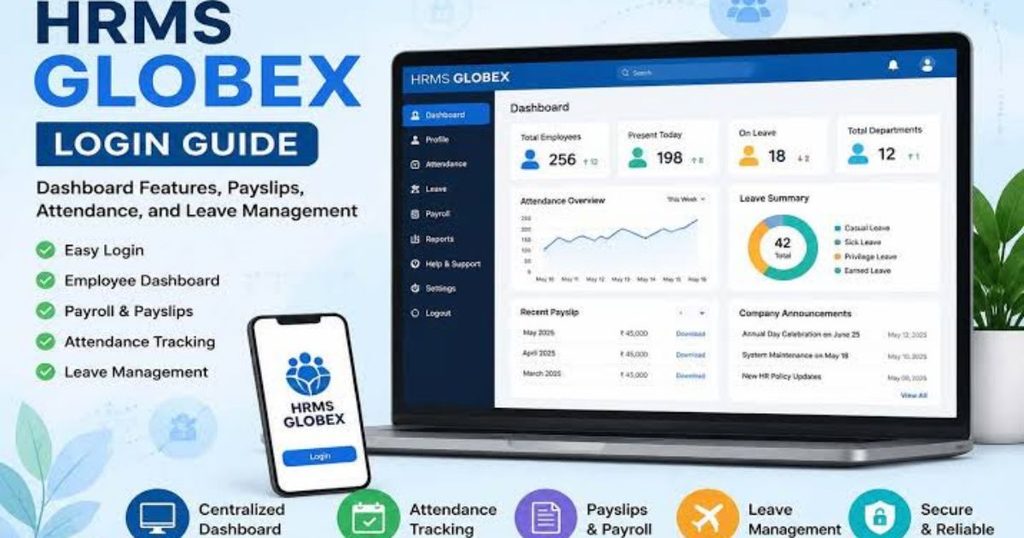
Employee management is a central purpose of an HRMS. A digital employee management system can give HR teams a structured way to maintain workforce information instead of relying on scattered documents. Depending on the organization’s configuration, records may include employee identification details, job information, department information, employment history, and related documentation. However, the exact fields available through HRMS Globex should be confirmed with the organization operating the system because public documentation does not expose every internal function. Even so, centralized records can make routine HR administration more organized. Consequently, employees can spend less time repeating basic information while HR professionals can focus more attention on workforce needs.
Employee Self-Service
Employee self-service is another commonly associated HRMS function. Instead of asking HR for every routine request, employees can potentially access information and complete approved actions themselves. Depending on the configuration, this may include checking personal details, reviewing workplace information, submitting requests, or accessing available documents. Third-party descriptions associate HRMS Globex with self-service capabilities, although the exact options can vary between deployments. This approach can reduce repetitive administrative work because employees handle straightforward tasks directly. Meanwhile, HR teams can devote more time to complex cases, policy questions, employee relations, and strategic workforce planning rather than answering every basic information request.
Attendance Tracking With HRMS Globex
Attendance management can become complicated when organizations rely on manual registers, spreadsheets, or separate systems. An HRMS can provide a centralized way to organize attendance information and connect workforce records with other HR processes. Several public descriptions of HRMS Globex associate the system with attendance management. However, employees should remember that attendance rules are normally determined by their organization. Working hours, late-arrival policies, holidays, corrections, and approval procedures can therefore differ between employers. If an attendance record appears incorrect, the best approach is to follow the organization’s established correction process rather than attempting to alter information without authorization. Accurate attendance records can also support smoother payroll administration.
Why Digital Attendance Matters
Digital attendance records can reduce repetitive data entry and make workplace information easier to review. For example, when attendance information is organized within an HR system, authorized staff may be able to identify missing records or unusual entries more quickly. Furthermore, connecting attendance with other HR processes can reduce the need to transfer information manually between separate files. This can save time and lower the chance of transcription mistakes. Nevertheless, technology does not automatically guarantee accurate records. Employees still need to report issues promptly, managers must review exceptions when required, and HR teams need clear policies. Therefore, a reliable process depends on both the software and responsible administration.
Payroll and Payslip Management
Payroll is one of the most important areas of human resource administration. Employees need accurate information about salary, deductions, payment dates, and related records. Public descriptions frequently associate HRMS Globex with payroll management and payslip access. However, users should verify exactly which payroll services their employer provides through the system. An employee portal may display payroll information without necessarily controlling every part of the organization’s payment process. If a payslip contains an unexpected amount, employees should contact payroll or HR through the official company process. In addition, users should never share payslips or salary information publicly because these documents can contain confidential personal and financial details.
Payroll Data and Accuracy
Payroll accuracy depends on several inputs, including employee records, attendance information, approved leave, deductions, and company policies. Consequently, an HRMS can help organize these inputs, but it does not remove the need for review. HR and payroll professionals still need to check unusual transactions and resolve discrepancies. Employees can also help by keeping their personal information current and reporting errors promptly. If the system displays an incorrect bank detail, tax-related field, deduction, or payment amount, the employee should use the organization’s official correction procedure. Most importantly, never attempt to bypass controls simply to change payroll information. Strong processes protect both employees and the organization from avoidable financial problems.
Leave and Time-Off Management
Leave management is another common HRMS function. Traditionally, employees might submit leave requests through email, paper forms, or direct messages to managers. A centralized system can make requests easier to track because the request, approval status, and available records can remain connected. Public descriptions of HRMS Globex associate the platform with leave management. Still, the precise leave options depend on company policy. For example, an organization may define different categories for annual leave, sick leave, holidays, or other approved absences. Therefore, employees should rely on their employer’s published policies when determining eligibility instead of assuming that a particular option in the system automatically means leave has been approved.
How Leave Requests Can Help Employees
A digital leave workflow can make the status of a request easier to understand. Instead of searching through long email conversations, an employee may be able to see whether a request is pending, approved, or rejected within the available portal. Managers can also have a clearer record of requests that require attention. Furthermore, centralized records can help HR maintain more consistent documentation. However, the software should not replace communication when a leave request is urgent or unusual. If an employee has an emergency absence, they should follow the organization’s emergency reporting procedure first. The HRMS should then be used according to company instructions to document or complete the appropriate administrative steps.
Performance Management in HRMS Globex
Performance management is an area where public documentation provides a more specific reference. Available information indicates that the Globex HRMS environment includes a Performance Management System, or PMS, with workflows involving employee self-reviews, reporting-manager reviews, final reviews, and appraisal-letter acceptance. This means eligible users may encounter performance-related sections in their account. However, the exact process can depend on the organization’s review cycle. For example, an employee may only see a performance-review option when an active review period applies to that account. If the option is missing, employees should check with their reporting manager or HR department instead of assuming that their account is defective.
Why Performance Reviews Matter
A structured performance workflow can help organizations document goals, feedback, reviews, and appraisal decisions in a consistent format. Employees can also benefit from having a clear record of their review activities. Nevertheless, software cannot determine whether performance feedback is fair or useful. Managers still need to communicate expectations clearly, provide relevant examples, and discuss development opportunities. Similarly, employees should review submitted information carefully before completing a self-review or accepting a document. By combining structured software with meaningful communication, organizations can make performance management more organized. Therefore, the most useful outcome comes from treating the HRMS as a supporting tool rather than a substitute for good management practices.
Recruitment and Onboarding
Some third-party descriptions also associate HRMS Globex with recruitment and onboarding functions. Recruitment software can help organizations organize candidate information, while onboarding tools can guide new employees through administrative requirements. These functions can be useful because the period between accepting a job and becoming fully operational often involves multiple forms, approvals, documents, and internal steps. However, public information does not provide enough detail to confirm that every organization using a Globex-related HRMS has the same recruitment features. Therefore, employers should verify the actual modules available in their deployment. Likewise, candidates should communicate with recruiters through official channels when submitting personal information or employment documents.
Onboarding Through a Digital HR System
Digital onboarding can create a more organized experience for new employees. Instead of receiving disconnected instructions from several departments, employees may have a central place to complete required administrative steps. Furthermore, HR teams can monitor which tasks remain incomplete and follow up when necessary. A well-organized onboarding process can include employee information, policies, documentation, training requirements, and access requests. However, the exact process differs between organizations. As a result, new employees should follow instructions from their employer even when the HRMS contains unfamiliar options. If a document request seems unusual, verify it with HR before uploading anything. This simple precaution can protect personal information while keeping the onboarding process moving.
Benefits of Using HRMS Globex
The potential benefits of a centralized HR system are largely connected to organization, accessibility, and reduced manual administration. First, HR teams can maintain information in a structured digital environment. Second, employees can potentially access relevant services without contacting HR for every routine request. Third, managers can receive tools for approvals and workforce processes appropriate to their roles. In addition, digital records can make information easier to locate than paper-based files. Public descriptions of HRMS Globex emphasize centralized employee management, payroll, attendance, leave, performance, and self-service. The practical value, however, depends on how the system is configured and used by each organization.
Benefits for Employees
Employees can benefit from having common HR information available through one workplace portal. For instance, they may be able to check attendance, review payroll-related information, submit requests, or participate in performance processes without relying entirely on manual communication. This can make routine administration more convenient. Additionally, a centralized system may provide clearer records of requests and approvals. However, employees should understand their organization’s specific setup because not every account provides identical features. Therefore, the best way to learn what your account supports is to review official company instructions or contact HR. A digital portal works most effectively when employees understand both the technology and the workplace policies behind it.
Benefits for HR Teams
HR professionals can gain substantial administrative value from centralized systems because repetitive processes can become more structured. Employee records, attendance information, leave requests, and performance workflows can be managed within connected processes instead of separate manual files. Consequently, HR staff may spend less time searching for information or transferring data between documents. Furthermore, standardized workflows can make approvals easier to monitor. Nevertheless, implementation quality remains important. Poorly configured permissions, outdated employee information, or unclear policies can reduce the value of any HRMS. Therefore, HR leaders should regularly review access controls, data quality, workflows, and employee feedback. Technology should support HR operations rather than create another layer of unnecessary complexity.

HRMS Globex Security and Privacy
Security is especially important for an HRMS because employee systems can contain highly sensitive information. Depending on the organization’s setup, HR records may include personal information, employment details, payroll information, documents, and performance records. Therefore, employees should treat their HRMS credentials as confidential. Use strong, unique passwords where permitted, and never share login details through email or messaging services unless the organization’s approved process specifically requires it. Furthermore, verify unexpected requests with HR or IT. Public information about the Globex portal confirms a credential-based login system, but users should not assume that a website’s existence alone proves that every security claim made about it is accurate.
Protecting Your HRMS Account
Account protection begins with simple habits. First, access the portal through a trusted employer-provided address. Next, keep your password private and avoid saving it on shared computers. Additionally, sign out when using a public or shared device. If you receive a suspicious message asking for credentials, verify it independently with your organization. You should also report unusual login activity, unexpected password-reset messages, or suspicious requests immediately. Most importantly, never enter your employee credentials into a website simply because an online article calls it an “HRMS Globex login.” Several unrelated websites currently discuss the term, and public sources indicate that confusion exists between different sites using similar names.
Is HRMS Globex a Public HR Software Product?
One important point deserves special attention. Search results currently show different descriptions of HRMS Globex. The website hrmsglobex.com describes itself as an all-in-one HR software platform covering areas such as employee data, payroll, attendance, leave, performance, and recruitment. Meanwhile, other recent sources describe HRMS Globex primarily as an employer-configured employee portal associated with hrms.theglobex.com. Public information does not clearly establish that these two websites are the same service. Therefore, readers should avoid treating every search result as an official source. If you are an employee, your employer’s direct instructions should take priority over third-party articles.
Common HRMS Globex Login Problems
Employees can encounter several routine access problems when using workplace HR systems. A forgotten password is one example, and public information indicates that the portal provides a password-recovery process involving an employee code. Other issues can include an incorrect username, expired credentials, browser problems, account restrictions, or an unavailable service. First, check that you are using the correct employer-provided portal. Next, verify your credentials carefully without repeatedly guessing passwords. If recovery does not work, contact your organization’s HR or IT team. Furthermore, avoid downloading unknown “login fix” software or providing your password to unofficial support services. Authorized workplace support remains the safest route for account problems.
What to Do If Your Account Does Not Work
If your HRMS account stops working, begin with the organization’s official troubleshooting instructions. Check your internet connection and confirm that you are visiting the correct portal. Then use the official password-recovery option if you have forgotten your password. If the issue continues, contact the appropriate HRMS administrator or IT support team. Provide the error message and explain what you were attempting to do, but do not send your password. If the problem involves payroll, attendance, leave, or performance information, mention the relevant module so support staff can investigate efficiently. Finally, keep a record of support requests when the issue affects an important deadline, such as payroll or a performance review.
How Organizations Can Get More Value From an HRMS
Organizations can improve the value of an HRMS by starting with clear processes rather than simply installing software. First, define which HR activities the system should support. Next, establish appropriate user roles and access permissions. Then, clean employee data before migration or implementation. Furthermore, train HR teams, managers, and employees according to their responsibilities. Clear instructions can reduce confusion and prevent unnecessary support requests. Organizations should also review workflows periodically because policies and workforce structures change over time. Most importantly, sensitive HR information should receive appropriate security controls. A successful HRMS implementation is therefore a combination of technology, accurate data, good processes, employee training, and responsible administration.
HRMS Globex vs. Traditional HR Processes
Traditional HR administration often depends on paper documents, spreadsheets, emails, and manual approvals. While these methods can work for small operations, they may become difficult to manage as an organization grows. A centralized HRMS can reduce the number of disconnected processes by giving authorized users one digital environment. For example, attendance records can be easier to organize than handwritten registers, while leave requests can be easier to track than long email chains. However, moving from manual processes to an HRMS requires preparation. Data must be accurate, employees need training, and workflows need testing. Therefore, digital transformation should be treated as an operational change, not merely a software installation.
Things to Check Before Using HRMS Globex
Before using any HRMS portal, verify several basic points. First, confirm the portal address with your employer. Second, understand which features your account should contain. Third, review your organization’s instructions for passwords, password recovery, and support. Fourth, protect personal and payroll information carefully. Finally, question conflicting information found on third-party websites. These steps are particularly useful for people searching for HRMS Globex because current online results contain multiple descriptions of the name. Rather than assuming that the highest-ranking search result is official, employees should rely on direct communication from their employer. That approach can reduce confusion and help protect workplace credentials.
Frequently Asked Questions About HRMS Globex
What is HRMS Globex?
HRMS Globex is commonly described as a Human Resource Management System associated with employee and HR processes. Public information links the name with an online employee portal and various HR functions.
What does HRMS stand for?
HRMS stands for Human Resource Management System. It is software used to organize employee information and manage digital HR processes.
How do I access the HRMS Globex portal?
Use the portal address provided directly by your employer or HR department. Public sources identify an employee login portal associated with hrms.theglobex.com.
What should I do if I forget my password?
Use the official password-recovery option available through your organization’s portal. Public information indicates that employee-code verification may be part of the recovery process.
Can employees check attendance through HRMS Globex?
Attendance management is commonly associated with the system. However, the exact features available to an employee depend on the organization’s configuration and account permissions.
Does HRMS Globex handle performance reviews?
Public documentation indicates that the Globex HRMS environment includes a Performance Management System with several review stages.
Is every website discussing HRMS Globex official?
No. Search results currently contain different websites and descriptions using the same or similar terminology. Users should verify portal details through their employer rather than relying solely on third-party articles.
Conclusion
HRMS Globex is commonly associated with digital HR management and an employee-facing HR portal. Its reported uses include employee information management, attendance, payroll-related services, leave administration, and performance management. Public documentation also confirms that some users can access a Performance Management System and that the employee portal provides login and password-recovery functionality. However, online information about the name is not completely consistent, particularly regarding the relationship between hrmsglobex.com and the hrms.theglobex.com portal. Therefore, employees should verify access details through their organization. If you use HRMS Globex at work, save your employer’s official portal address, protect your credentials, and contact HR or IT whenever information seems unclear.